Short answer
To make a Windows 11 USB with Rufus, select a Microsoft ISO under Boot selection, keep GPT and UEFI (non CSM) for a UEFI PC, and press START. A Windows User Experience dialog then offers setup changes, such as removing the TPM check or creating a local account. Tick only what you need, then confirm the erase.
How do you make a Windows 11 USB with Rufus?
- Get the ISO. Download the Windows ISO from Microsoft's software download page, or use the DOWNLOAD option in Rufus.
- Select drive and ISO. Pick the spare USB under Device and the ISO under Boot selection.
- Keep the UEFI pair. Leave GPT and UEFI (non CSM) for a UEFI PC; use MBR only for a legacy BIOS PC.
- Press START. Press START to open the Windows User Experience dialog.
- Choose setup options. Tick only the options you need and leave the silent install option unticked.
- Confirm the erase. Confirm the warning that all data on the drive will be destroyed, then wait for READY.
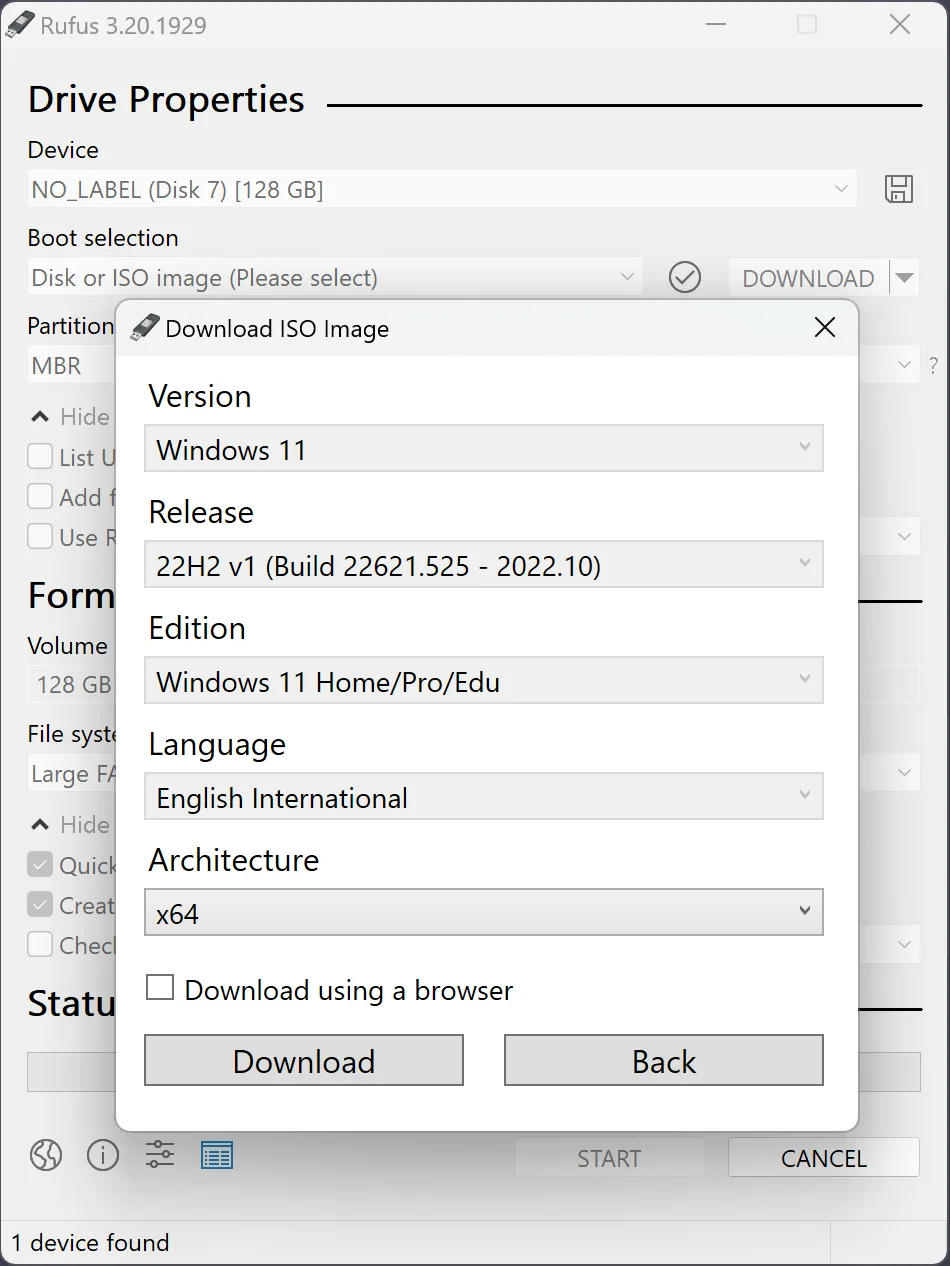
Where should the Windows ISO come from?
The Windows ISO should come from Microsoft. Download it from Microsoft’s Windows 11 download page, which also lists a SHA-256 value for each language, or use the program’s DOWNLOAD option. The project README describes that option as a way to get official Microsoft Windows 8, 10 or 11 retail ISOs. Either route gives the same file, and the checksum guide shows how to compare its hash.
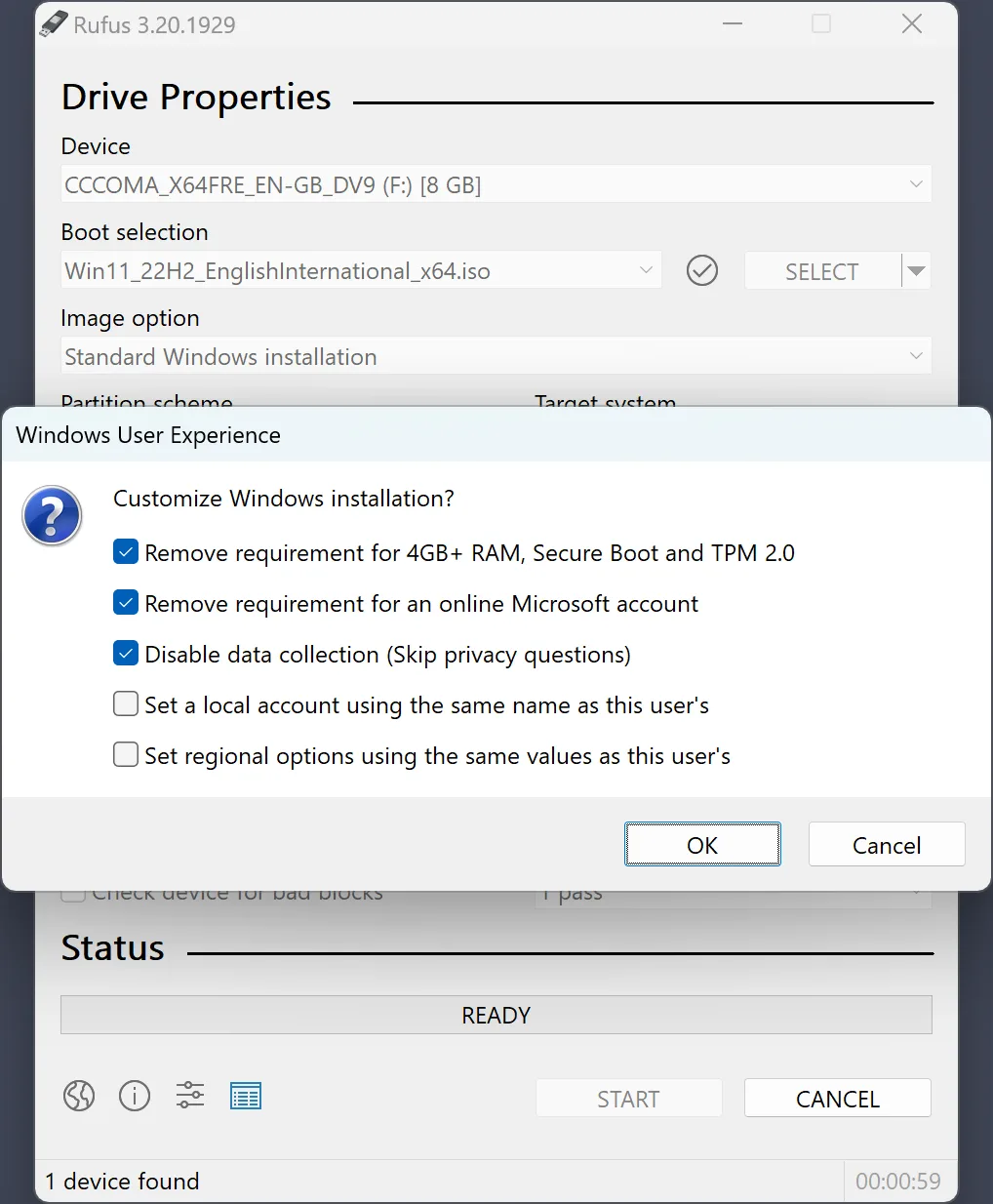
What is the Windows User Experience dialog?
The Windows User Experience dialog appears after you press START with a Windows 10 or 11 ISO, under the heading “Customize Windows installation?” (label text). Each ticked option adds an answer file to the USB, so Windows setup applies it on the target PC. Nothing changes on the computer running the program. The table on this page lists the six main options with their exact labels. Rufus remembers your choices, so read the ticks each time.
Which extra options did recent releases add?
Release 4.14 added a “Quality of Life” option that stops setup from forcing Copilot, OneDrive, Outlook and Fast Startup, and an option to apply Microsoft’s SkuSiPolicy.p7b file (labels). The same release added the silent installation option. Release 4.10 added media for PCs that use Microsoft’s newer Secure Boot certificates, which needs a Windows 11 25H2 ISO (release notes). Leave those ticked only if you know you need them.
Why is the silent install option dangerous?
The silent option makes a drive that erases the first detected disk of any PC it boots on and installs Windows there with no prompt (label). Before it can be used, the program asks you to confirm that other disks are disconnected, that you will not leave the stick in a PC you do not plan to erase, and that data loss is your responsibility (acknowledgements). Release 4.15 fixed a bug where it failed at 75% (release notes). Erase warning: for an ordinary installer, leave it off.
| Option | What it changes during Windows setup |
|---|---|
| Remove requirement for 4GB+ RAM, Secure Boot and TPM 2.0 | Skips setup's hardware checks; it does not stop Windows from using a TPM or more RAM |
| Remove requirement for an online Microsoft account | Lets setup finish with a local account |
| Create a local account with username | Creates that account with an empty password that must be changed at first sign-in |
| Set regional options to the same values as this user's | Copies keyboard, time zone and currency from the PC running Rufus |
| Disable data collection (Skip privacy questions) | Answers no to the data-sharing questions for you |
| Disable BitLocker automatic device encryption | Stops setup from encrypting the system disk unless you ask later |
Frequently asked questions
Is removing the TPM requirement safe?
The option only removes Windows setup's hardware check. Its own tooltip says it is safe to leave on even when the PC has a TPM or more RAM. Microsoft does not support Windows 11 on hardware below its requirements, so updates are not guaranteed there.
What is the silent install option?
Release 4.14 added an option that installs Windows with no prompts on the first detected disk of whatever PC boots the drive. It erases that disk without asking. Rufus makes you tick three acknowledgements first; leave it off for a normal installer.
Can Rufus download the Windows ISO?
Yes. The arrow beside SELECT switches the button to DOWNLOAD, which fetches official Windows 8, 10 or 11 retail ISOs from Microsoft. It needs the update check to be allowed. Downloading from Microsoft's own page in a browser works just as well.