Short answer
To check a USB in Rufus, expand the advanced format options, tick Check device for bad blocks, choose a pass count (1 pass is the default), and press START. The test writes patterns over the whole drive, so it erases it. By default it also detects fake drives that report more capacity than they have.
How do you run a bad blocks check in Rufus?
- Back up the drive. Copy off every file you need; the test overwrites the whole drive.
- Select the drive. Under Device, pick the USB and confirm its name and capacity.
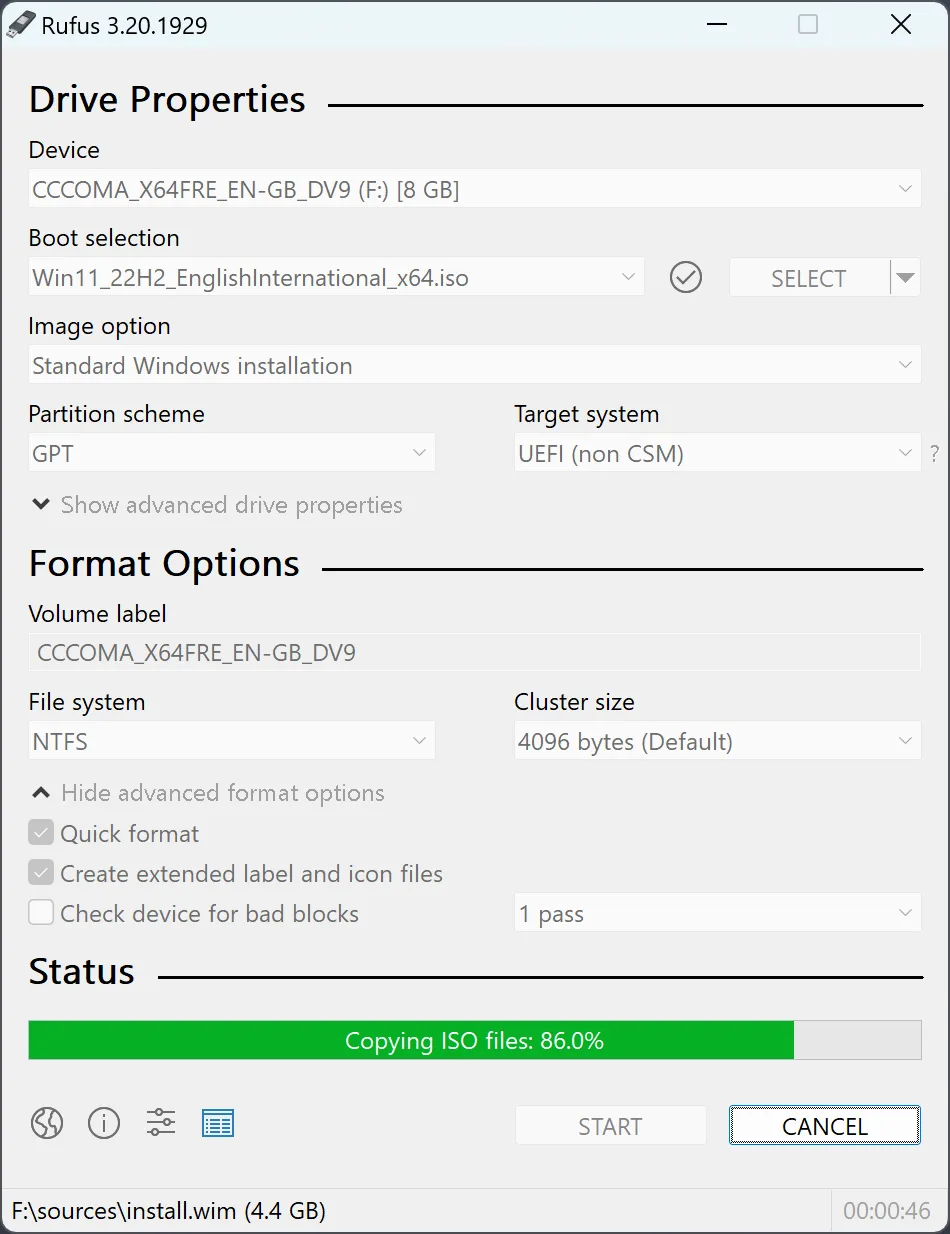
- Show the advanced format options. Click the advanced format options toggle under Format Options.
- Turn on the check. Tick Check device for bad blocks and choose 1 pass, 2 passes, or 4 passes for the drive's NAND type.
- Run the test. Press START, confirm the erase warning, and leave the drive connected until the status bar shows READY.
- Read the result. Replace the drive if the report shows any bad blocks or a fake capacity.
When is a bad blocks check worth running?
A bad blocks check is worth running on any USB drive you did not buy from a known retailer, one that has produced write errors, or one that will carry an installer you need to trust. The project README lists bad blocks checks, including detection of fake flash drives, among its features. One clean pass is a screen, not a guarantee: flash wears out, and a drive that passes today can still fail later.
Which pass count should you choose?
The pass list in the checked release offers 1 pass, 2 passes, or 4 passes for SLC, MLC or TLC NAND, and the first entry, one pass, is selected when the program starts (source). The four-pass options use pattern sets tuned for single-, multi- and triple-level cell flash (badblocks.c). Most current consumer drives use TLC flash. If you do not know the type, two passes is a sensible middle ground.
How does Rufus detect a fake drive?
Fake drives report a larger capacity than their flash holds and silently loop writes back over the start of the drive. During a bad blocks check the program also writes each block’s own number and reads it back, so a looped block shows up as an error. This detection is on by default; Alt+B turns it off and on (source). A drive that fails it should go back to the seller, not into a drawer.
What do the results mean?
The status bar shows the current write or read pass and an error count, and the final report gives the number of bad blocks found. Any bad block means the drive should not hold installation media. Erase warning: the test has already overwritten the drive at that point, so there is nothing to recover. For a clean result, continue with the bootable USB guide; the check does not test the ISO, which the checksum guide covers.
| Option | What it does | When to use it |
|---|---|---|
| 1 pass (default) | Writes one test pattern and reads it back | A quick screen of an unknown drive |
| 2 passes | Two patterns, write then read each | A drive that showed errors before |
| 4 passes for SLC NAND | Four patterns tuned for SLC flash | Industrial or high-end drives |
| 4 passes for MLC NAND | Four patterns tuned for MLC flash | Many older consumer drives |
| 4 passes for TLC NAND | Four patterns tuned for TLC flash | Most current consumer drives |
Frequently asked questions
What does the bad blocks option check?
It writes test patterns across the whole drive and reads them back, counting blocks that return the wrong data. By default it also writes block numbers to catch fake drives whose reported capacity loops back over the same flash.
Will this check erase the selected USB?
Yes. The test overwrites every block, and Rufus then formats or writes the drive as selected. Back up files first and assume every partition on the selected device will be destroyed.
How long does a bad blocks check take?
Each pass writes and reads the full capacity, so time grows with drive size and the number of passes. One pass on a large, slow USB 2.0 drive can take over an hour; four passes take roughly four times as long.