Short answer
Rufus is safe when it comes from its official site, its GitHub release, winget or the Microsoft Store. It is free, GPL-licensed software by Pete Batard, and the official file is signed by Akeo Consulting. It sends nothing online unless you allow its update check. The main risk is selecting the wrong drive, because a write erases it completely.
How do you check that your Rufus file is genuine?
- Check the source. Confirm the file came from the official site, the GitHub release, winget or the Microsoft Store, not an ad or download portal.
- Check the signer. Right-click the file, open Properties, then Digital Signatures, and confirm the signer is Akeo Consulting.
- Check the hash. Run Get-FileHash in PowerShell and compare the SHA-256 value with the digest on the official release.
- Protect your drives. Unplug every drive you are not writing to before you open the program.
Who makes the program and who signs it?
The program is written by Pete Batard and published under the GPL-3.0-or-later license, with the full source on GitHub. The official download page says the executable is digitally signed and the signature should state Akeo Consulting. The program’s own update check accepts only three signer names, Akeo Consulting, Akeo Systems, Pete Batard (pki.c), so a file signed by anyone else is not an official build.
What does it send over the internet?
It sends nothing until you answer its first-launch question about update checks. If you allow them, it checks at most once a day by default (net.c) and only while the window is open, because it runs no background service (update policy). The same check can offer newer Secure Boot revocation (DBX) files. The optional Windows ISO download connects only when you use it. Pages on this site do not change any of that.
How does the project handle security fixes?
Security reports go privately to the project by email, as its security policy describes, and fixes are listed in the changelog. Release 4.12 fixed a flaw in how the Windows ISO download script was run (CVE-2026-2398), and release 4.15 fixed an unsafe XML parsing issue (ChangeLog.txt). Keeping the program current matters more than any one-time check, which is why the update prompt is worth accepting.
Why is drive selection the bigger risk?
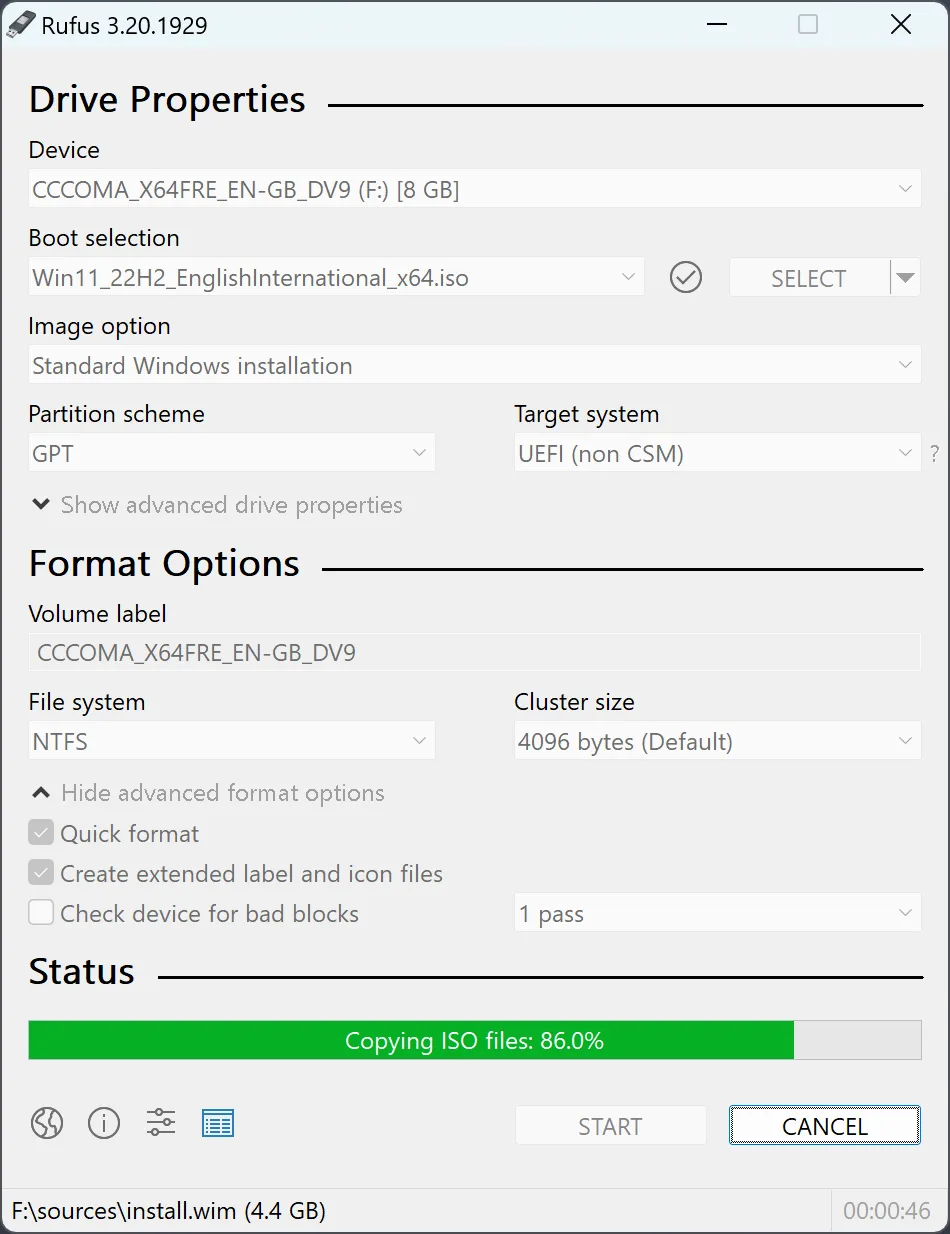
Drive selection is where users actually lose data. Erase warning: writing an image destroys every partition on the selected device. The program keeps USB hard drives and SSDs out of the Device list unless you tick List USB Hard Drives, but a second flash drive always appears. Unplug everything you are not writing to, then follow the bootable USB guide. For the ISO itself, compare the publisher’s hash with the checksum guide.
| Question | Answer | Where it comes from |
|---|---|---|
| Who makes it? | Pete Batard; builds are signed as Akeo Consulting | Official download page and pki.c |
| What license? | GPL-3.0-or-later, full source on GitHub | LICENSE.txt |
| Does it install a service? | No; update checks run only while it is open | Update policy text in rufus.loc |
| Does it go online by default? | Only after you allow update checks on first launch | net.c |
| Where are security flaws reported? | support@akeo.ie, per the project's security policy | SECURITY.md |
Frequently asked questions
Where is the official Rufus download?
The official download is on rufus.ie and on the project's GitHub Releases page. The winget package and the Microsoft Store listing published by Akeo Consulting deliver the same program. Avoid renamed copies from download portals or search ads.
Why does my antivirus flag it?
The program asks for administrator rights and writes directly to disks, which some antivirus heuristics treat as suspicious. If the file is signed by Akeo Consulting and its SHA-256 matches the official release, the alert is very likely a false positive; report it to your antivirus vendor.
Can Rufus erase the wrong drive?
Yes, if the wrong Device is selected and the write is confirmed. It hides USB hard drives by default, but a second flash drive is always listed. Unplug other removable drives and compare the selected label and capacity before START.